Showing posts with label iPhone. Show all posts

Social Downloader lets you download media from social networking apps

Social Downloader lets you download media from social networking apps

Chances are you’ll see a photo or video you like as you peruse various social networking apps on your iPhone from time to time, but not all services will let you save them to your device.
A new jailbreak tweak called Social Downloader by iOS developer Elias will grant you access to saving just about any image or video from various social networking apps.
Social Downloader supports all of the following apps:
There are plans to support other apps too, but those are a work in progress. Nevertheless, the most popular social networking apps are supported in the initial release, and this is a great start for the tweak.
The process to save media differs from app to app because all of the apps’ interfaces are different. The following is required in each app:
  • WhatsApp story – save button is added to the bottom left corner of the story
  • Facebook – enter the video in full-screen mode and tap and hold on it
  • Instagram feed – double-tap on the photo or video from your feed
  • Instagram story – tap on the ellipsis button in the bottom right corner of the app
  • Twitter – enter the GIF or video in full-screen mode and tap and hold on it
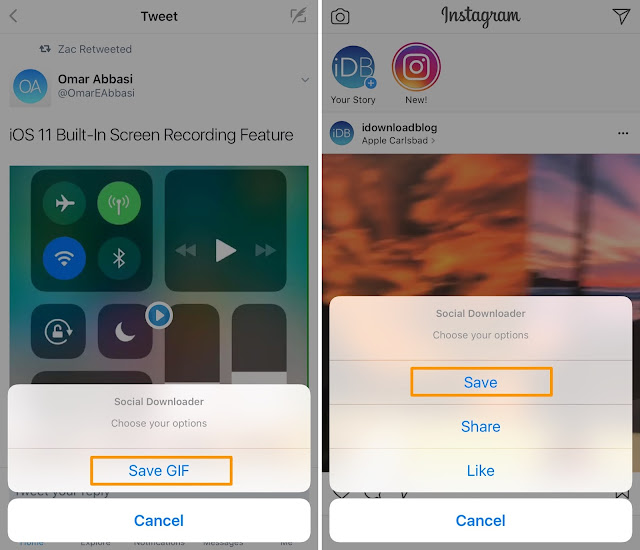
Shown above, you can see what the save prompts look like in both the Instagram and Twitter apps. A button entitled “Save” is added to each menu.
Social Downloader adds a preferences pane to the Settings app where you can toggle any social networking app on or off on demand. For performance reasons, we recommend only enabling the tweak for apps that you’ve actually installed:
A respring button is included at the bottom of the pane so you can save your changes.
While it’s nice to have the power to download media from social networks on demand, we can’t stress enough that you should respect intellectual property and copyright laws of all works that don’t belong to you. With that in mind, you shouldn’t be sharing someone else’s work without permission. Given that you can accept that caveat, Social Downloader might be a worthwhile download.
Social Downloader works on jailbroken iOS 7, 8, 9, and 10 devices with any of the supported apps installed on it, and is available from Cydia’s BigBoss repository for $1.00.
Do you like the idea of being able to download any media from your favorite social networking apps? Share why or why not
Read More

Orange sunlight wallpapers

Orange sunlight wallpapers

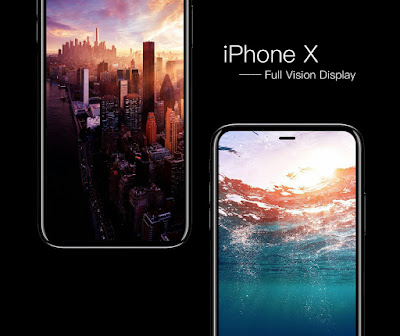
With the iPhone 8 approaching, we continue to see rumor leaks and schematics, providing a clearer look at the upcoming flagship device. A 3D rendering is even available, based on the previous schematic leaks.
Last week, we featured a design mockup of the iPhone 8, based on many of the current rumors. Most notably, the large, edge-to-edge screen will be the most impressive feature. In the mock-up, many iDB readers were asking for the wallpapers in the sketch. Step inside for the ones we could get in our hands.

iPhone 8 concept wallpapers

As always, if you are able to find excellent wallpapers, send them my way via @jim_gresham, or follow along for mid-week picks!
DownloadiPhone
DownloadiPhone
DownloadiPhone

Trouble downloading these images?

We’re having minor issues with image files right now. If you’re having trouble downloading any of these images, try the following workarounds:
  • On iPhone or iPad: tap and hold on an image and select Save Image. Or use 3D Touch to load up the full image and save it to your library.
  • On a Mac or PC: right click on an image and select “open in new tab” or the equivalent for your browser.

We apologize for this issue, which will be fixed promptly.
Read More

How to Install iOS 10.3.2 Beta 1

How to Install iOS 10.3.2 Beta 1

The iOS 10.3,2 Beta 1 update arrived recently today with tons of new iOS 10.3 features, important iOS 10.3.2 security fixes and upgrades. This guide will show you how to install iOS 10.3 and iOS 10.3.2 on your iPhone, iPad or iPod touch.
Apple released iOS 10.3 on March 27th as a free upgrade and iOS 10.3.2 on April 3rd. Users can start the iOS 10.3.2 download directly on their iPhone or iPad without connecting to a computer. If you prefer to install the iOS 10.3.2 update with iTunes we’ll also show you that option.
You can use this tutorial to upgrade to iOS 10.3.2 from iOS 9 or iOS 10. There is no need to upgrade through different versions, updating now will install the latest version.

Read More

iOS 10.3.2 Beta 1 Download

iOS 10.3.2 Beta 1 Download
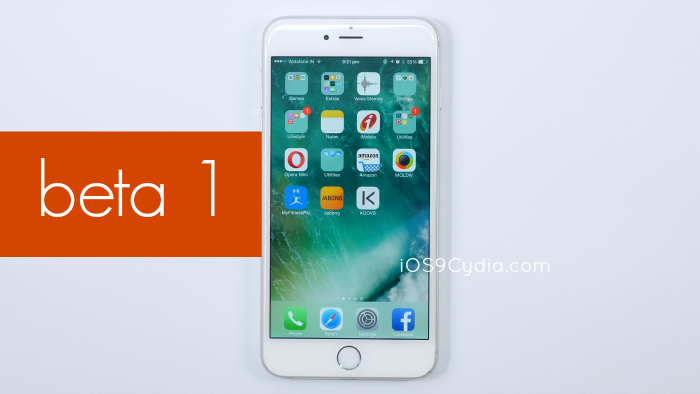
While users are busy updating to the recently seeded iOS 10.3, Apple has silently pushed out the first iOS 10.3.2 beta on 28th March 2017. iOS 10.3.2 beta 1 was a complete surprise for users, developers, and jailbreakers alike, as the firmware brought some great performance improvements, and Apple might also introduce some interesting features in this new update. So if you haven’t updated to iOS 10.3.2 beta 1 yet, just follow this simple tutorial given below and install the beta for free without paying $99 for the Apple Developer Program membership .
Image : iOS 10.3.2 Beta 1 Download


Method 1 : Install iOS 10.3.2 Beta 1

Please note that since iOS 10 beta is a copyright of Apple, hence no direct download links can be provided here. We can only provide a link to another website which hosts the iOS 10 beta firmware file. [ Download Here ]. You can also install iOS 10.3.2 beta using our UDID Registration [ext link] method explained below in Method 2 .

Install iOS 10.3.2 Beta without a Developer Account :

Image : iOS 10.3.2 Beta 1 OTA


Always make it a point to create a backup of your iOS device using iTunes or iCloud before upgrading to a beta firmware. This is because the beta may contain a few bugs and you might want to restore back to the previous version.
  1. Your iOS device must be running iOS 10
  2. Create a full backup of your device via iTunes or iCloud.
  3. Make sure that you have the latest version of iTunes installed in your computer; if not, then update it first. itunes update mac
  4. Next, open iTunes and go to the device summary. Now hold down the Option [ Alt ] key if you’re on Mac or the Shift key if you’re on Windows and simultaneously click on the Restore button. itunes restore
  5. A prompt will come up and will ask you to select the IPSW file. Use the the specific iOS 10.3.2 IPSW file for your specific device model. Download beta files here . ipsw-ios-10
  6. If you are on Windows, you might need to extract the downloaded file or change its extension to .ipsw if it is not already having .ipsw extension.
  7. After selecting the firmware file, the restore process will be completed by iTunes and your device will be upgraded to iOS 10.3.2.
Note : If you use iTunes services in your device after restoring to iOS 10.3.2 using the above method, you might face activation issues. So use only iCloud services.

Method 2 : Register your Device UDID

If you want to download and install iOS 10 beta legally but don’t want to pay $99 for Apple’s Developer Program, you can join our UDID Registration Service [ext link]. It costs only $10 per year and you get all the beta updates for one year totally free.azhar udid
For more tutorials and news, subscribe to our Newsletter and follow us on Facebook.
Read More

Apple releases iOS 10.3.1 with Wi-Fi vulnerability fix, brings back support for iPhone 6s

Apple releases iOS 10.3.1 with Wi-Fi vulnerability fix, brings back support for iPhone 6s


Apple on Monday issued a minor update to iOS 10.3, which released on March 27, 2017. The new iOS 10.3.1 software update comes with a build number of 14E304 and is recommended for all users. According to release notes accompanying the download, iOS 10.3.1 includes bug fixes and improves the security of your iPhone, iPad or iPod touch. The software update can be downloaded over-the-air via Settings → General → Software Update on your iOS device.
Aside from bug fixes, iOS 10.3.1 brings back support for 32-bit devices like iPhone 5 and iPhone 5c. Apple’s security document sheds more light on bug fixes, acknowledging that iOS 10.3.1 patches a bug that could let an attacker within range to execute arbitrary code on your device’s Wi-Fi chip.
To fix the Wi-Fi vulnerability, a stack buffer overflow was addressed through improved input validation. This particular vulnerability was discovered by Gal Beniamini of Google’s Project Zero.
You can download the full firmware from iDownloadBlog’s Downloads page.
iOS 10.3.0 came with 100+ bug fixes along with performance improvements and security enhancements. Some of the new features in iOS 10.3 include:
  • Apple File System
  • iCloud Analytics opt-in feature
  • Revamped iCloud section, now at the top of the Settings app
  • Siri and CarPlay improvements
  • Reduce Motion for websites
  • Settings toggle to disable in-app ratings and reviews
  • Hourly forecast in Maps
  • Navigation improvements for Mail’s Conversation View
  • Easier typing on Chinese and Japanese keyboards
  • Find My AirPods for locating a misplaced earbud in the Find My iPhone app
For the full overview of changes in iOS 10.3, read our thorough walkthrough. Information on the security content of iOS 10.3.1 is available in Apple’s support document.


As mentioned, iOS 10.3.1 is available for iPhone 5 and later, the fourth-generation iPad and later and the sixth-generation iPod touch and later. iOS 10.3.2 beta 1 was seeded to Apple’s registered developers last week.
If you spot other changes in iOS 10.3.1, let us know in comments or shoot us an email to tips@iDownloadBlog.com and we’ll update the article accordingly.
    Read More